The Best Way to Film Overhead on a Phone
Filming top-down on a phone needs the right rig. Overhead arms, C-clamps and tripods for steady, shadow-free shots of cooking, crafts and unboxings.
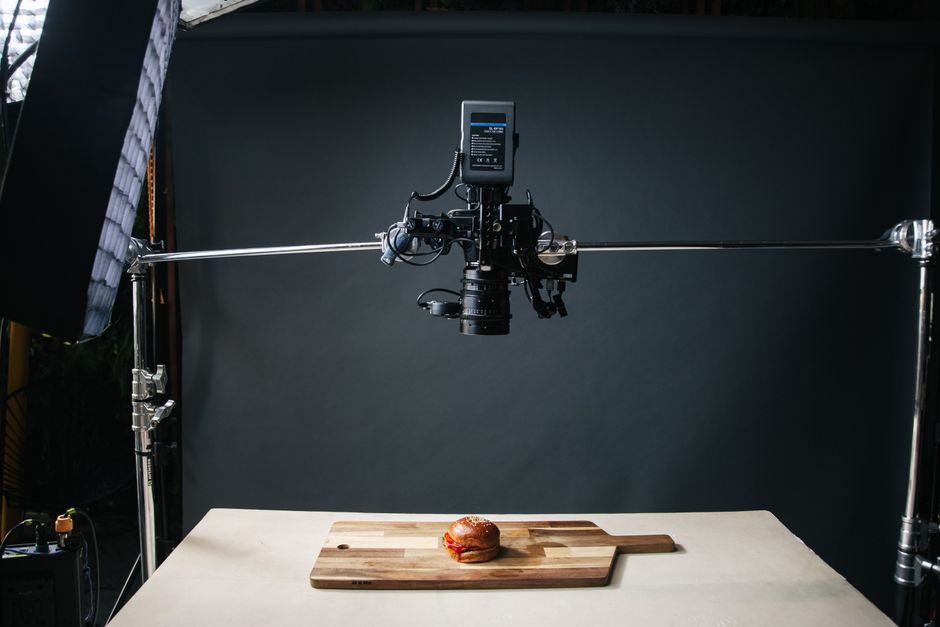
Top-down, or overhead, shots are the backbone of cooking, craft and unboxing content, and they are the one angle a normal phone stand cannot do. You need something that suspends the phone flat above your work surface without a leg or a hand getting in shot, which a standard tripod is not designed for. The good news is that a handful of affordable rigs solve it cleanly.
What do you need to film overhead?
You need three things: a way to hold the phone directly above the scene, stability so the shot does not wobble, and clearance so the rig itself and your own shadow stay out of frame. The rig options that deliver this are an overhead arm that clamps to your desk or table and reaches out over it, a tripod with a horizontal arm or a flip-out centre column, or a sturdy gooseneck clamp for lighter setups. A phone clamp or adapter connects the phone to whichever you choose.
Overhead arm or tripod: which is better?
A desk-clamp overhead arm is usually the best choice for a fixed workspace: it bolts to the table, stays rock solid, and frees up the floor. A tripod with a horizontal centre column is more flexible and portable, and better if you film in different places or need height, though it takes up floor space and can be less stable when the arm is extended. For occasional, lightweight top-down shots, a gooseneck clamp is the cheapest option, at the cost of some wobble.
How do you avoid shadows and shake?
Shadows are the classic overhead mistake. Light the scene from the sides rather than from behind the phone, so the rig and your hands do not cast a shadow onto the work surface; two side lights or a window plus one light works well. For shake, tighten every joint, avoid touching the surface the rig clamps to while filming, and start recording a second or two before you act so any initial wobble can be trimmed. If your phone or app offers stabilisation, leave it on.
Cheap ways to film top-down
You do not need to spend much. A gooseneck phone clamp attached to a shelf or table edge gives a workable overhead shot for very little. In a pinch, some creators rest a phone on a clear surface raised above the scene, or clamp a basic tripod's arm sideways, but these are fiddly and prone to shake. For anything regular, a proper overhead arm pays for itself in saved frustration.
How high should the phone be?
Height is a trade-off, not a target, and it is set by what has to fit in frame against how much room you need to work underneath.
Go too low and a chopping board or a craft mat will not fit, and your hands crowd the edges. Go too high and the subject shrinks, the rig flexes more at full extension, and you lose the sense of being over the work that makes top-down footage compelling. For a typical worktop scene, most people end up somewhere around 40 to 60 cm above the surface, but the number matters less than the method.
Set it by framing rather than by measuring. Put the widest thing you will use in shot, a full board or the largest pan, then raise the phone until that fits with a margin around it. Lock it there and leave it, because consistency between clips is worth more than a perfect single frame.
Keep enough headroom to work. If your hands have to squeeze under the phone to reach, the rig is too low regardless of how good the framing is, and you will knock it.
How do you get the shot perfectly level?
A top-down shot that is a few degrees off looks subtly wrong, and it is the most common flaw in home overhead footage. A rectangular board films as a trapezoid, edges converge, and no amount of editing fully rescues it.
The fix is to make the phone parallel to the surface, not merely pointed at it. Most phones include a level in the camera app or the built-in compass or measure tools, which is enough to get within a degree. Turn on the camera grid as well and align it with the straight edges of your work surface, since a table edge or a board edge is a far more sensitive reference than judging the middle of the frame.
Check it again after mounting the phone. Clamps tilt as they tighten, and an arm at full extension will sag slightly once it takes the weight, so the level you set before loading the phone is rarely the level you end up with.
What camera settings should you use?
One setting matters more than all the others for overhead work, and it is the reason so much home top-down footage pulses and shifts.
Lock exposure and focus
On most phones, a long press on the subject locks AE and AF. Without it, every time a hand enters frame the phone re-meters and the whole shot brightens or dims, and it may hunt for focus. Lock it on the work surface before you start.
Lock white balance if your app allows it
Auto white balance drifts when something large and coloured moves through frame, so a red pan or a dark sleeve can shift the colour of the whole scene mid-clip. A native camera app may not expose this; most third-party camera apps do.
Pick a frame rate and stay on it
Shoot everything for one video at the same resolution and frame rate. Mixing 30 and 60 fps clips in a timeline causes avoidable trouble in the edit for no visible benefit.
Avoid digital zoom
Zooming crops into the sensor and costs real detail. Move the rig closer or lower instead, which keeps full quality and usually gives a more natural perspective.
How do you handle long takes?
Overhead work is often one continuous take of a recipe or a build, which raises problems short clips never surface.
Heat is the first. A phone recording at high resolution for a long stretch warms up, and phones throttle or stop recording when they get too hot. Filming under lights makes it worse. Dropping the resolution, keeping the lights a little further back, and taking the case off all help.
Power is the second. A long shoot will outlast a battery, so plan to run the phone on a charger, and route the cable along the arm so it cannot swing into shot or pull the rig off level. Note that charging while recording generates additional heat, which is the usual reason a phone that manages an hour unplugged struggles plugged in.
Reaching the phone is the third. Every trip up to press record risks nudging the framing, so use a remote shutter, a voice command or a timer. If you must touch it, steady the arm with your other hand while you press.
Finally, leave the camera roll space. Running out of storage part-way through a take loses the take, and long high-resolution clips consume it quickly.
Read next: the creator kit finder works the same decision through for every format we cover, so if you shoot more than overhead it will tell you what changes.