Overhead Camera Mount for Desk: How to Choose One
How to choose an overhead camera mount for a desk: arm load, clamp fit and reach, the five mount types, and why I bought the NEEWER ST008.
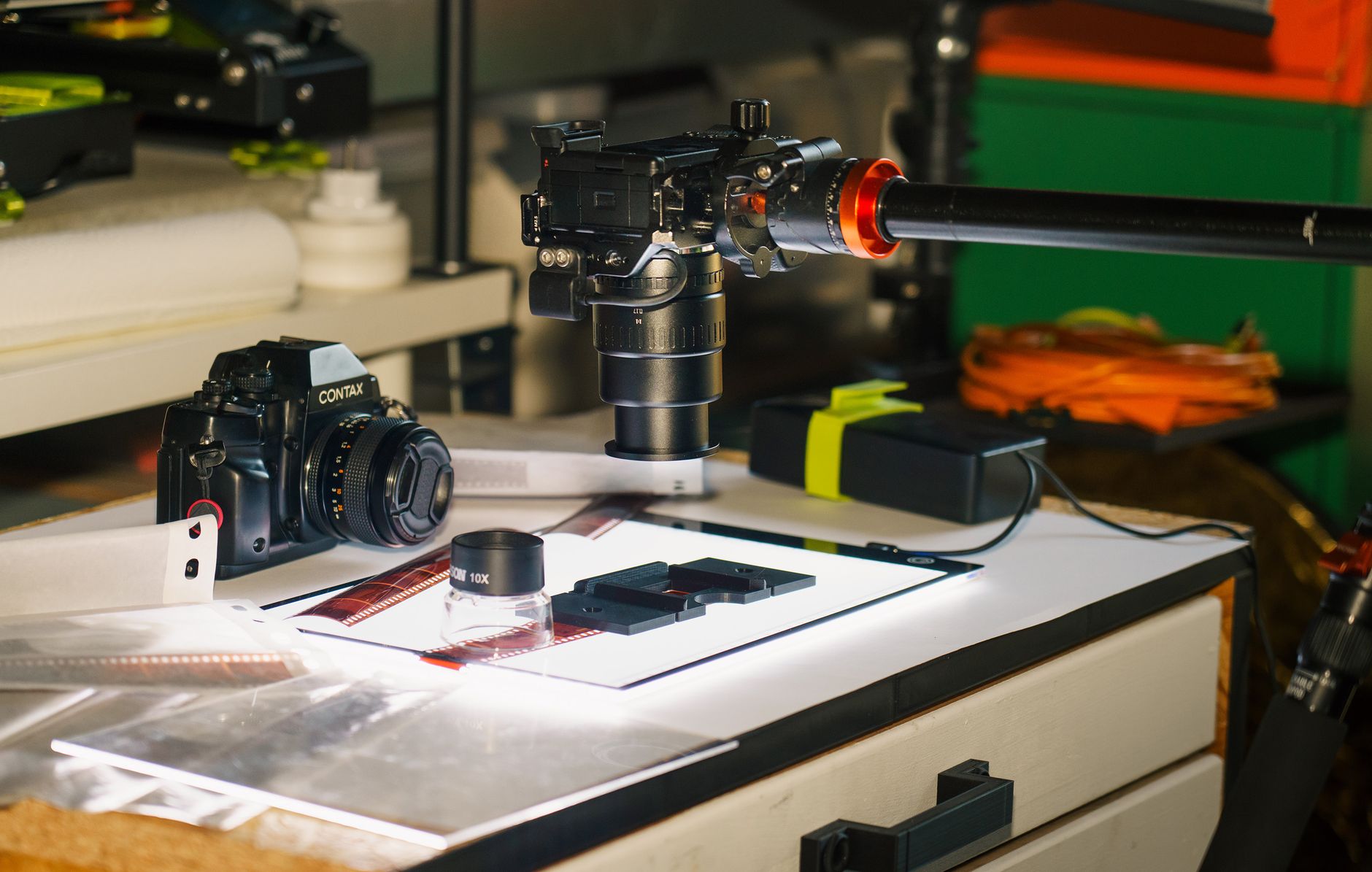
An overhead camera mount for a desk is the piece of kit that turns a desk into a top-down filming table. It clamps to the desk edge, rises up, and reaches out so a camera or phone points straight down at your hands, a product or a page. This guide covers the hardware: the five kinds of mount, the three numbers that decide whether one suits your desk, and which mounts are worth a look on Amazon UK (Amazon's British store, where every mount below has a live product page).
My own channel is mostly voice-led, with desk and product b-roll, which is exactly the shot an overhead mount is for. I bought the NEEWER ST008 (a clamp-on aluminium tree stand from Neewer, with a centre column and two cross arms) for my desk, and I explain why further down. This is a research guide rather than a test report: the specifications come from each maker's listing, checked on 3 November 2026. For the filming side (phone height, levelling and exposure settings), see my guide to the best way to film overhead on a phone.
What is an overhead camera mount for a desk?
It is a support that holds a camera above the desk surface, pointing down, without a tripod leg in the frame. Every desk version has the same three parts.
- A clamp. A C clamp (a screw clamp shaped like the letter C) grips the desk edge. Its opening sets the thickest desk it fits.
- A column or base arm. The upright part that sets the height. On a tree stand it is a telescopic pole; on an articulated arm it is the first jointed section.
- An arm and a head. The arm reaches out over the desk, and the head at its end (a ball head, a phone clip or a bare screw) holds the device.
The arm does the hard work. It holds the camera out to one side of the column, so the weight acts as a lever on every joint. That is why the arm, not the column, sets what you can hang overhead.
Which type of overhead desk mount suits you?
Five designs cover almost everything on sale in the UK. The right one depends on how many devices you want on it and how much desk you need to reach across.
| Type | What it is | Best for |
|---|---|---|
| Tree stand | A telescopic column on a desk clamp, with one or more cross arms clamped to it | A camera overhead plus a light or mic on the same stand |
| Articulated arm | A single jointed arm on a desk clamp, folding like an anglepoise lamp | Long reach across a deep desk, one device |
| Stand with a holding arm | A short desk column with a small side arm and a ball head on top | A first overhead setup on a budget |
| Magic arm | A friction arm with a crab clamp at one end and a phone clip at the other | A phone, clamped to a desk edge, shelf or stand tube |
| Horizontal tripod arm | A cross arm that replaces a tripod's centre column | Floor-standing setups and heavy cameras, away from the desk |
The first three clamp to the desk. A magic arm clamps to almost anything, and a horizontal tripod arm stands on the floor, which suits a room more than a desk. If you film in more than one place, my phone overhead guide covers the tripod route.
How much weight can an overhead arm hold?
Read the arm rating, and ignore the headline figure if it belongs to the column. The gap between them is large on every rig I looked at.
- Neewer's ST008 listing rates the centre column for 5 kg and each cross arm for 2.5 kg, and never more than 5 kg in total at the joints.
- Neewer's DS002 rig, its larger desk model, rates the column for 10 kg while its reaching arms carry 1.5 kg and 2 kg.
- The holding arm on Neewer's budget tabletop stand carries 1 kg, according to its Amazon UK listing.
Add up what will hang on the arm: the camera with its lens, plus the ball head, plus any phone clip or quick-release plate. A phone is easy. Google lists the Pixel 9a at 186 g, so any arm here carries it. A camera with a lens is where the cheaper arms run out, so weigh yours on a kitchen scale before you buy, and leave headroom rather than loading an arm to its limit at full stretch.
Will the clamp fit your desk?
Measure the desk top before you order. The clamp's opening is the hard limit, and the published figures vary more than you might expect.
| Mount | Clamp opening |
|---|---|
| NEEWER ST008 | 0 to 9 cm |
| NEEWER tabletop stand with holding arm | 0 to 9 cm |
| SmallRig 4324 desktop bracket | Up to 7 cm |
| SmallRig 25.9in magic arm | Up to 5.5 cm |
| Ulanzi ZJ02 | Up to 4.8 cm |
Thickness is only half of it. The clamp needs a flat lip underneath to bite on, so check for a drawer, a frame rail or a cable tray under the edge you want to use. Ulanzi's overhead mounting guide makes the point that how well the clamp sits on the edge matters more than how hard it grips: a clamp on a narrow lip will rock however tight you turn it.
Clamp at a desk leg or a corner if you can. The edge is stiffest there, so the whole rig flexes less when you type or lean on the desk.
How far does the arm need to reach?
Far enough to put the lens over the middle of what you are filming, and no further. Every extra centimetre of arm adds leverage on the joints and the clamp, so the camera bounces more when the desk is knocked.
The published reach figures:
- Ulanzi ZJ02: extends to 98 cm, with an overhead shooting height of up to 65 cm, on the Amazon UK listing. Ulanzi's own page gives 89 cm, so plan on the shorter figure.
- NEEWER ST008: a two-section arm of 31.5 cm to 56.5 cm and a fixed 27 cm arm, on a column of 33.5 cm to 95.5 cm.
- NEEWER tabletop stand: a 36 cm holding arm, on a stand of 44 cm to 103 cm.
To work out what you need, measure from the desk edge where the clamp will sit to the centre of your usual working area. A desk that is 60 cm deep, filmed from the back edge, needs about 30 cm of reach to centre the lens. A wide flat-lay on a deep desk is where a long articulated arm like the ZJ02 earns its place.
What fittings will you need to add?
Most mounts end in a bare screw, so check what is in the box before you plan a shoot.
- 1/4-inch thread: the standard screw on the base of cameras, phone clips and small lights. Every mount here has one.
- 3/8-inch and 5/8-inch threads: the larger screws used by heavier accessories and microphones; 5/8-inch is the common mic-stand thread. The ST008 comes with adapters for both.
- Ball head: a swivelling joint that lets you point the camera straight down and lock it. The tabletop stand, the ZJ02 and the SmallRig 4324 include one; the ST008 does not.
- Phone clip: a sprung clamp that grips a phone and has a 1/4-inch socket. The SmallRig 4324 and the magic arm include one; the tabletop stand's listing says a phone holder is needed separately.
If your mount lacks a head or a clip, a combined part covers both. The Ulanzi super clamp with phone holder and ball head adds a 360-degree ball head and a phone holder with 1/4-inch and 3/8-inch threads.
Which overhead desk mounts are worth a look?
These five are on Amazon UK with live product pages, checked on 3 November 2026. Prices change often, so check the current price on each listing before you buy.
| Mount | Type | Arm load | Price tier |
|---|---|---|---|
| NEEWER tabletop stand with holding arm | Stand with a holding arm | 1 kg | Budget |
| SmallRig 25.9in magic arm | Magic arm | 1 kg | Budget |
| NEEWER ST008 | Tree stand | 2.5 kg each | Mid-range |
| Ulanzi ZJ02 | Articulated arm | 2 kg | Mid-range |
| SmallRig 4324 | Articulated arm | 2 kg | Mid-range |
The cheapest complete desk option is Neewer's tabletop stand. Neewer (a Chinese photo and video accessories maker) sells it with a 44 cm to 103 cm column, a ball head on top and a 36 cm side arm, so a camera can sit on top while a light or phone goes on the arm. It was rated 4.5 out of 5 from 376 Amazon UK ratings when I checked. Of the beginner options, it was my first choice, as it looks the sturdier one and I wanted steady overhead desk shots.
For a phone and awkward angles, the SmallRig magic arm is the flexible one. SmallRig (a Chinese maker of camera cages and rigging) builds it as a jointed arm with a crab clamp that opens to 55 mm and also grips round tubes from 15 mm to 44 mm, so it fits a shelf or a light stand as well as a desk. The phone clip takes phones 60 mm to 95 mm wide. I think it will be the better option for some people, as it looks more versatile in the angles it can reach. It was rated 4.3 out of 5 from 97 ratings.
For several devices on one stand, the ST008 is the one I bought. It cost only a little more than the tabletop stand, and I chose it for its strength and its ability to hold more than one arm: I have a portable monitor it could hold, and the desk mic I am going with can attach to it too. It can also hold a heavier camera, which gives me more options with lenses. If I was only buying a mount to hold a camera and nothing else, I would have gone with the cheaper Neewer. It was rated 4.6 out of 5 from 84 ratings. It has no ball head or phone clip in the box, so budget for one.
For the longest reach, the Ulanzi ZJ02 is a single four-section aluminium arm with a ball head, rated for 2 kg. Ulanzi (a Chinese creator-accessories brand) gives it the longest reach in this group, though its 4.8 cm clamp is the narrowest, so measure a thick desk first. It was rated 4.8 out of 5 from 186 ratings.
For smooth adjustment, the SmallRig 4324 uses hydraulic damping joints, so the arm holds wherever you leave it rather than dropping when a knob is loosened. It has a 30 mm centre pole, a 7 cm clamp, a ball head and a phone clip, rated for 2 kg. It was rated 4.5 out of 5 from 59 ratings.
Above these, larger rigs such as Neewer's DS002 carry more arms and a heavier column, at around three times the price. For a single camera or phone over a home desk, the five above cover it.
How do you set up an overhead mount so it stays steady?
Clamp at the stiffest point
Fit the clamp near a desk leg or corner, on a flat lip with nothing underneath, and tighten it before you add anything else.
Set the column upright
Check the column is vertical before you extend the arm. A column that leans makes the camera drift off level as you raise it.
Use the shortest arm that frames the shot
Extend the arm only until the lens sits over the centre of your working area. Less reach means less bounce.
Point the camera straight down
Use the ball head to set the lens parallel to the desk, then lock it. A tilted camera turns a square board into a trapezoid.
Fit a quick-release plate
Ulanzi's guide recommends a matched quick-release plate, so the camera clicks back into the same overhead position each session instead of being screwed on again.
Tie the cables along the arm
Run power and data cables along the arm and down the column with cable ties, so nothing swings into shot or tugs the camera off level.
Is a desk mount better than a tripod for overhead shots?
For a fixed desk, yes. A desk mount takes up no floor space, stays where you set it between sessions, and puts the camera exactly where the work happens. A tripod with a horizontal arm is the better tool when you film in different rooms, need more height than about a metre, or hang a heavy camera that no desk arm carries.
The deciding question is whether you will film at the same desk every time. If you will, clamp a mount on and leave it set up, so the overhead shot is ready the moment you sit down.
What should you buy first?
Start from what goes on the arm. A phone on its own needs no more than a magic arm or the budget tabletop stand. A camera with a lens needs an arm rated well above its weight, which points to the 2 kg to 2.5 kg arms. A camera plus a light, a mic or a monitor on the same stand points to a tree stand like the ST008.
Then measure the desk: its thickness for the clamp, and its depth for the reach. Those two numbers rule out more mounts than price does, and they take a minute with a tape measure.
Frequently asked questions
What is the best overhead camera mount for a desk?
How much weight can a desk overhead arm hold?
Will an overhead mount fit a thick desk?
Do overhead desk mounts come with a phone holder?
Can an overhead desk mount hold a microphone as well?
Sources
- Neewer UK: ST008 overhead camera desk mount specifications
- Neewer UK: DS002 overhead camera rig desk mount
- Ulanzi: overhead camera mounting for desk-based content
- Google Store: Pixel 9a technical specifications
- Amazon UK product listings for each mount linked above, checked on 3 November 2026
Filming overhead on a phone
YouTube desk setup
Budget lighting for product videos