What Is the GoPro Media Mod? A HERO8 Beginner's Guide
What the GoPro HERO8 Media Mod does, the mic adapter and cage alternatives, and what to check before buying one for YouTube audio.
The GoPro Media Mod turns a HERO8 Black from a sealed action camera into something closer to a small vlogging camera. On its own, the HERO8 has nowhere to plug in a microphone and nowhere to mount one. The Media Mod adds both, which is why it matters to anyone using a HERO8 for YouTube.
This guide explains what the Media Mod is, what each of its ports does, the other ways to add a mic input to a HERO8, and what to check before buying one. It recommends no product: it is the background that makes any Media Mod, adapter or cage listing readable. Every term is explained before it is relied on.
The routes to a mic input on a HERO8 within a beginner budget are compared, with a final choice, in the post on adding an external microphone to a GoPro HERO8, part of the series on what kit you need to start a YouTube channel.
What is the GoPro Media Mod?
The GoPro Media Mod is a camera frame made by GoPro. Media Mod is GoPro's name for a hard plastic frame that encloses one specific camera body. GoPro calls its add-on accessories Mods, short for modules. The HERO8 Black version (part number AJFMD-001) slides over the camera, replaces its battery door and folds out into a standard GoPro mount at the bottom. It weighs 50g and launched in the US at $79 (DC Rainmaker, a long-running independent gear-testing blog).
The HERO8 Black itself (GoPro's 2019 action camera) records up to 4K at 60 frames per second and has three built-in microphones, but its body has no microphone jack and no accessory shoe. The Media Mod exists to fill that gap. The GoPro HERO8 for YouTube guide covers the camera itself; this page covers the frame.
What does the Media Mod add to a HERO8?
Each part of the frame solves one limitation of the bare camera. Here is what each one does, according to DC Rainmaker and Digital Trends (a US consumer technology news and reviews site).
1. A 3.5mm microphone input
A 3.5mm input is the small round socket used by most camera microphones and wireless mic receivers. It carries an analogue signal, meaning the sound travels as a varying electrical voltage rather than as digital data. This socket is the main reason to own a Media Mod: it lets a clip-on, wireless or on-camera microphone feed the HERO8 directly, and a plugged-in mic automatically takes over from the camera's internal ones.
2. Two cold shoes
A cold shoe is a small metal or plastic bracket, the same shape as the flash mount on top of a stills camera, that holds an accessory without passing any power or signal to it. The Media Mod has two, one on top and one on the side. They give a microphone, a wireless receiver or a small LED light somewhere to sit on the camera, rather than on a separate clamp.
3. A built-in shotgun microphone
A shotgun microphone is a mic designed to pick up sound mainly from the direction it points, and less from the sides. The frame's built-in mic can be set to favour the front, the back, or record in stereo. The two main reviews disagree on how much it helps: DC Rainmaker heard no clear gain over the camera's own mics, while Digital Trends found it clearer but noted the bare camera handled background noise better. Both agree the real value is the 3.5mm socket, not the built-in mic.
4. Micro-HDMI out
HDMI is the video connection used by TVs and monitors, and micro-HDMI is its smallest plug. The port sends the camera's picture to a screen or a capture device, for playback or a live feed. DC Rainmaker found the output unreliable in practice, with sound and picture drifting out of sync, so it is a bonus rather than a reason to buy. The port is also how GoPro's Display Mod (a flip-up front screen for framing yourself) connects, and that screen only works with a Media Mod fitted.
5. A USB-C port for charging
The frame passes the camera's USB-C port through to the outside, so the HERO8 can be charged or run from a power bank while it records. The Media Mod has no battery of its own and draws a small amount of power from the camera.
How do you use an external mic with a Media Mod?
Once a mic is plugged in, the HERO8 needs to know what kind of mic it is. The camera's audio input menu (Preferences, then Input/Output, then Audio Input) offers settings that match the three kinds of device you might connect (DC Rainmaker):
- Standard Mic is for an unpowered mic, one with no battery that relies on the camera for the small voltage it needs.
- Powered Mic is for a mic with its own battery, which includes most on-camera shotgun mics and wireless receivers.
- Line In is for a device that sends a stronger, pre-amplified signal, such as a mixer or audio recorder.
Both mic settings also come in a Mic+ version that adds 20dB of gain. Gain is amplification of the incoming signal, and 20dB makes a quiet source substantially louder. Mic+ suits a quiet mic with no volume control of its own. A mic that has its own output level is usually better left on the plain setting and adjusted at the mic; the gain staging guide explains why.
The plug matters too. A TRS plug (two black rings on the tip) is the standard for camera inputs. A TRRS plug (three rings) is made for phones, and some camera inputs do not read it. If a mic ships with both cables, use the TRS one for the camera.
What are the other ways to add a mic to a HERO8?
The Media Mod is not the only route. A HERO8 owner who wants an external mic has three types of setup to choose between.
1. The Media Mod
One part that adds the mic input, both cold shoes, HDMI and charging, all made by GoPro for that body. The HERO8 version is discontinued, so it is now mostly bought used.
2. A USB-C to 3.5mm mic adapter
A mic adapter, often called a dongle, is a short cable that plugs into the camera's USB-C port at one end and offers a 3.5mm socket at the other. GoPro made its own, the Pro 3.5mm Mic Adapter (AAMIC-001), and GoPro support staff have confirmed it works with the HERO8. Third-party adapters also exist. The catch is recognition: the HERO8's USB-C port is not a general audio input, and owners have reported that some generic adapters were not detected at all. A dongle also leaves the camera's side door open and gives the mic nowhere to mount.
3. A cage plus an adapter
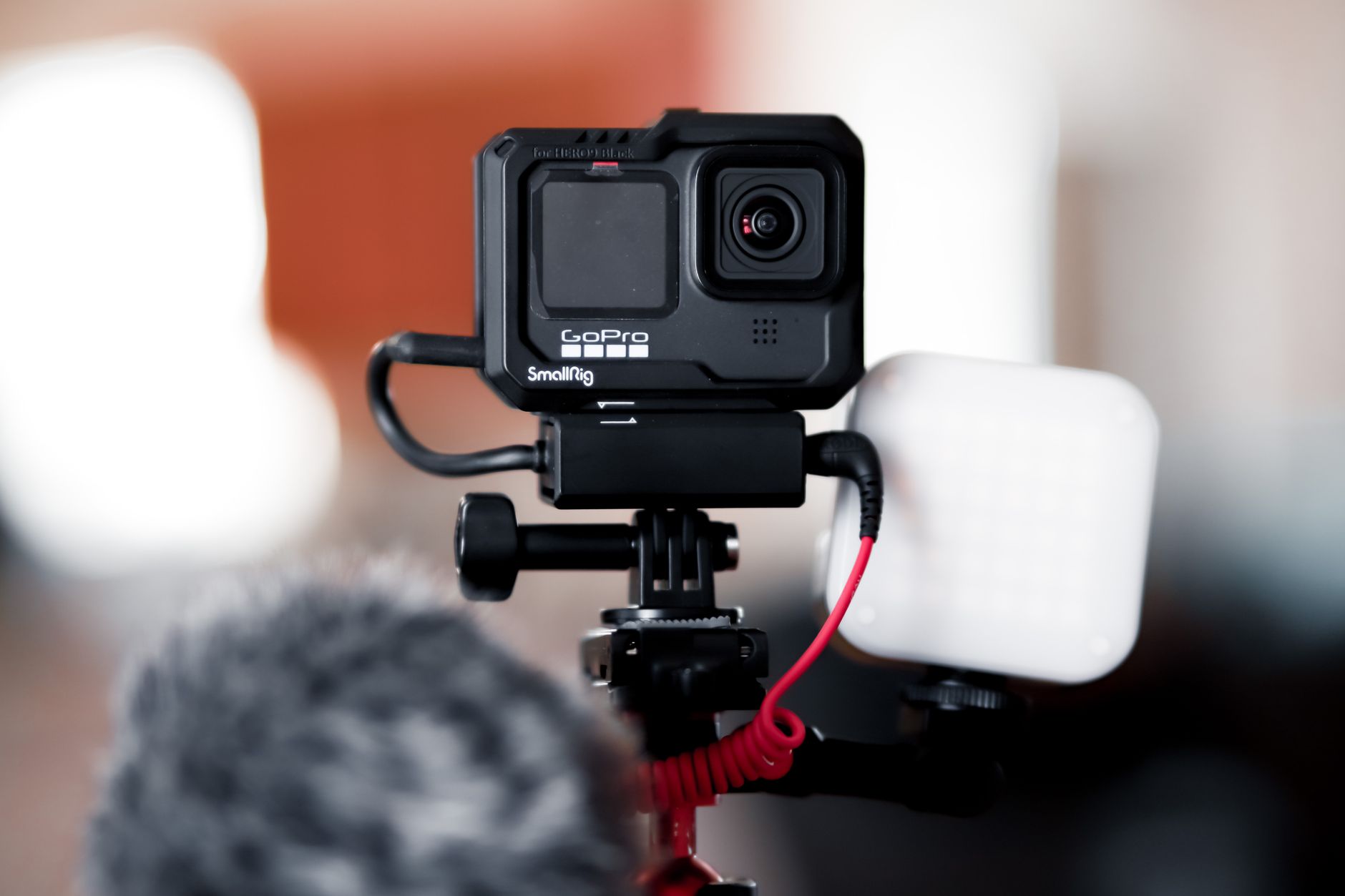
A cage is a metal or plastic frame, made by third-party brands, that adds cold shoes and screw threads for mounting accessories but carries no audio connection. Paired with a mic adapter, it does the same job as a Media Mod in two parts: the adapter supplies the socket and the cage supplies the mounting. The photo at the top of this page shows that kind of setup on a later GoPro.
There is also a free fourth option: record sound on a separate device, such as a wireless mic that records internally or a phone, and line the audio up with the video in the edit. It costs nothing extra but adds work to every video.
Media Mod, adapter or cage at a glance
- Media Mod: mic input built in, two cold shoes, plus HDMI and charging. Mostly bought used, and not waterproof.
- Mic adapter: a mic input on a short cable, with no mount. Not every adapter is recognised by a HERO8.
- Cage plus adapter: the adapter supplies the input and the cage supplies cold shoes and screw threads. Two parts, with the same adapter risk.
- Separate recorder: no input or mount needed, at the cost of syncing the audio in every edit.
What does the Media Mod cost you in use?
The frame solves the audio problem, and it brings trade-offs every buyer should know first (DC Rainmaker, Digital Trends).
- The battery door comes off. The Media Mod replaces it, so changing the battery or the memory card means taking the camera out of the frame and off its mount.
- No waterproofing. A bare HERO8 is waterproof; inside the Media Mod it is not. Light rain is fine, swimming is not.
- Extra bulk. The frame adds width and weight, and a mic with a large furry windshield on the top shoe can creep into the edge of the wide-angle frame.
- No headphone socket. There is no way to listen to the sound as it records, so a short test clip before each shoot is the only check.
- Unreliable HDMI. As above, the video output is not something to rely on for streaming.
What matters when choosing a Media Mod?
Whichever route you lean towards, work through these points in order.
1. Does it fit your camera?
This is the check that catches most buyers. Listings titled "GoPro Media Mod" mix the HERO8, HERO9 to HERO13 and MISSION 1 versions, and the later ones often appear first in search results. For a HERO8 Black, look for AJFMD-001.
2. Will the camera recognise the mic input?
The frame's socket is built for the HERO8, so recognition is not in doubt. With a third-party adapter it is, so buy from a seller with an easy return and test it on the day it arrives, with the camera's firmware up to date.
3. Do you need somewhere to mount the mic?
A clip-on wireless mic has a receiver that has to live somewhere. A wireless lavalier mic receiver usually clips to a cold shoe, so a setup with no shoe leaves it dangling on its cable. If the camera is handheld or on the move, a shoe matters; on a fixed tabletop shot, a separate clamp can do the job.
4. Condition, if buying used
A used Media Mod should have an intact door latch, a clean USB-C connector inside, and folding mount fingers that lock firmly. A worn latch is the fault that matters most, since it holds the camera in place.
5. Can you live without waterproofing?
If the camera spends time in water, the Media Mod has to come off for those shots, and audio falls back to the internal mics or a separate recorder.
6. How often do you swap batteries?
Long recording days mean several battery swaps, and each one means unclipping the frame. Running the camera from a power bank through the USB-C port is one way round it on a fixed shot.
Do you need a Media Mod for YouTube?
Only if the HERO8 is going to record your voice. For b-roll (the cutaway footage that plays over narration), mounted action shots or any video where the sound is recorded separately, the bare camera is enough, and a voice-led channel can record its narration on a desk microphone instead.
For talking to camera on the move, a HERO8 without an external mic will usually sound thin and pick up wind and handling noise, and the Media Mod or one of its alternatives is the fix. It is an accessory for a camera you already own rather than a reason to buy into GoPro: for someone starting from nothing, a phone plus a mic is the simpler first setup, as the phone-only YouTube guide explains.
Summary: how to read any Media Mod listing
- Check the part number: AJFMD-001 is the HERO8 Black version; anything else will not fit.
- Know the job: the 3.5mm socket is the point, the built-in mic is a minor extra.
- Compare the routes: Media Mod, mic adapter, or cage plus adapter, by whether you need a mount for the mic.
- Test any adapter on arrival, inside the return window, with the camera's firmware up to date.
- Accept the trade-offs: no waterproofing, no headphone check, and the frame comes off for every battery swap.
Frequently asked questions
What does the GoPro Media Mod do?
Does the HERO9 Media Mod fit the HERO8?
Is the GoPro HERO8 waterproof with the Media Mod on?
Can I plug a wireless mic into the Media Mod?
Does the HERO8 work with a USB-C mic adapter instead?
Can you change the battery with the Media Mod fitted?
Sources
GoPro HERO8 for YouTube
What Is a Wireless Lavalier Microphone?
Gain Staging and Recording Levels